A smart thermostat API allows connected thermostats to exchange supported data or commands with third-party software and platforms. For HVAC manufacturers, IoT brands, system integrators, and property technology companies, API support can turn a standalone thermostat into part of a larger connected HVAC ecosystem.
For OEM and connected HVAC projects, OWON develops smart thermostat platforms with API integration options that can be evaluated for connecting thermostat functions and supported data with customer HVAC, IoT, property management, or smart building platforms.
This guide explains what a thermostat API is, how API integration works, and what B2B customers should evaluate when selecting an API-enabled thermostat.
What Is a Smart Thermostat API?
API stands for Application Programming Interface. A thermostat API provides a defined way for authorized software to communicate with a connected thermostat or its supporting platform.
Depending on the product and API architecture, a thermostat API may provide access to supported information such as:
• Room temperature and humidity
• Occupancy or sensor information
• Heating and cooling setpoints
• HVAC operating mode and status
• Schedules or device settings
Some APIs may also allow authorized applications to change supported thermostat settings.
The exact data points, commands, authentication methods, and communication architecture vary by manufacturer and product. These capabilities should therefore be confirmed before designing an integration.
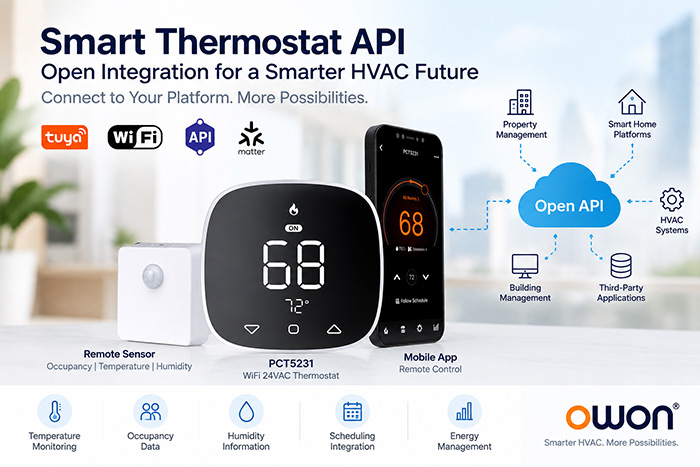
How Does a Thermostat API Work?
A connected thermostat collects temperature, HVAC status, and other supported information. An API can make selected information or functions available to an authorized third-party application.
A simplified architecture looks like this:
Smart Thermostat → API / Platform → Customer HVAC, IoT or Building Application
For example, an HVAC manufacturer may want thermostat information integrated into its own equipment platform. A smart home brand may want thermostat functions inside its branded application. A system integrator may need thermostat data as part of a larger smart building solution.
The API acts as the connection layer between the thermostat ecosystem and the customer’s software.
Open API vs. Local API: What’s the Difference?
These terms should not be treated as interchangeable.
An open API generally means an API is available for third-party integration under defined technical and authorization requirements.
A local API communicates within a local device or network environment, while a cloud API communicates through an Internet-connected cloud platform.
| API Type | Typical Architecture | Common Application |
|---|---|---|
| Local API | Device / local network | Local automation, edge systems |
| Cloud API | Device → cloud → application | Remote apps, multi-site systems |
| Open API | Integration interface | Third-party and OEM development |
An open API is not automatically a local API. Buyers searching for a smart thermostat with local API should verify the actual communication architecture rather than assuming that “open” means local access.
Why APIs Matter for HVAC and IoT Projects
For a homeowner, a thermostat app may provide everything needed. B2B projects often require more flexibility.
HVAC manufacturers may need thermostats integrated into their own equipment or control platforms.
Smart home and IoT brands may want thermostat functions incorporated into their own apps and connected-device ecosystems.
System integrators may need to connect HVAC devices with building, property, or automation platforms.
Property and hospitality technology providers may need thermostat and sensor information as part of a broader multi-unit management architecture.
In these applications, the question is not simply whether a thermostat has WiFi. The more important question is whether its integration architecture fits the customer’s overall system.
What to Check Before Choosing a WiFi Thermostat API
Before selecting an API-enabled thermostat, evaluate both the HVAC hardware and integration requirements.
HVAC compatibility: Check voltage, conventional or heat-pump configuration, heating and cooling stages, auxiliary heat, and dual-fuel requirements.
API architecture: Determine whether the required integration is device-level, local, cloud-based, or platform-level.
Available data and controls: Confirm which sensor values, HVAC status information, settings, and commands are available.
Security and authentication: Understand how devices, users, and third-party applications are authorized.
Scalability: Consider whether the architecture can support the expected number of thermostats, buildings, or customer accounts.
OEM customization: Determine whether firmware, user interface, branding, cloud, or other integration requirements can be adapted for the project.
These questions are particularly important because two products described as having a smart thermostat API may provide very different integration capabilities.
OWON Smart Thermostat API Integration for OEM and IoT Projects
OWON provides smart thermostat platforms for OEM and connected HVAC projects where API and third-party platform integration are part of the system requirements.
The solutions are intended for HVAC manufacturers, smart home brands, system integrators, and other B2B customers that need to combine thermostat control, sensing, connectivity, and their own software ecosystem.
PCT5231: Multi-Room Sensing for Connected HVAC
The PCT5231 WiFi thermostat works with most compatible 24V heating and cooling systems, including conventional HVAC, heat pumps, auxiliary and emergency heat, and dual-fuel/hybrid applications.
A key advantage is support for up to 10 remote zone sensors. Compatible sensors provide occupancy, temperature, and humidity sensing, allowing room information to be collected beyond the thermostat location.
This makes PCT5231 relevant to connected HVAC projects where multi-room sensing and third-party system integration are part of the project requirements.
PCT533: Occupancy and Humidity-Aware HVAC Integration
The PCT533 WiFi thermostat provides another platform for connected 24VAC HVAC projects. It combines built-in occupancy sensing with temperature and humidity sensing and supports humidity-management functions.
This makes PCT533 particularly relevant to HVAC and IoT projects where integrated occupancy detection, humidity management, and third-party platform integration are important requirements.
PCT5231 and PCT533 therefore address different sensing needs while providing platforms that can be evaluated for OEM and connected HVAC integration projects.
What Can OWON Thermostat API Integration Enable?
Depending on the selected thermostat platform and project requirements, OWON can evaluate API integration for applications such as:
• Connecting thermostat information with a customer’s HVAC or IoT platform
• Integrating supported temperature, humidity, occupancy, and HVAC information
• Connecting thermostat functions with branded web or mobile applications
• Supporting property management and smart building integration
• Developing customized OEM thermostat solutions involving hardware, firmware, and platform requirements
The exact API architecture, available data points, control commands, authentication method, and local or cloud communication requirements should be confirmed for each OEM project.
This project-specific approach is important because API integration requirements can vary significantly between an HVAC manufacturer, smart home platform, multifamily project, and building management application.
Frequently Asked Questions
Do smart thermostats have APIs?
Some do. API availability, supported data, control commands, authentication methods, and integration architecture vary by manufacturer and model.
What is a smart thermostat with an open API?
A smart thermostat with an open API provides an interface that authorized third-party developers or platforms can use for supported integrations. The exact capabilities depend on the API implementation.
Is an open thermostat API the same as a local API?
No. An open API describes integration availability, while a local API describes where communication takes place. An open API may use a local, cloud, or other architecture.
Can a thermostat API integrate with a building management system?
Potentially. Compatibility depends on the thermostat API, building management architecture, supported data and commands, communication methods, and project requirements.
What should OEMs ask about thermostat API integration?
Ask about API architecture, supported data and commands, authentication, device management, cloud requirements, scalability, documentation, firmware customization, and technical support.
Conclusion
A smart thermostat API can make a thermostat more than a standalone HVAC controller. It can provide the integration layer needed to connect HVAC control and supported sensor information with a broader IoT, property management, or smart building ecosystem.
For HVAC manufacturers, IoT brands, and system integrators, OWON thermostat platforms provide a foundation for combining 24VAC HVAC control, sensing, connectivity, OEM customization, and API integration within a project-specific architecture.
The right solution should be selected based not only on HVAC compatibility, but also on the data, control, communication, security, and integration requirements of the complete system.
Related reading:
[ Lockable Thermostat Guide: Password, PIN Lock and Temperature Limits Explained ]
Post time: Sep-18-2026


