A smart energy meter diagram shows how an electricity meter connects to power lines, current transformers (CT clamps), and a monitoring network.
Understanding these connections is important when installing an energy monitoring system in a home, commercial building, or solar installation. Incorrect wiring or CT placement can affect measurement accuracy and the interpretation of energy flow.
This guide explains four common wiring arrangements, how CT clamps work, and how WiFi or Ethernet connects an energy meter to a mobile app. The OWON PC4713 smart energy meter is used as a practical example.
How Does a Smart Energy Meter Work?
A smart energy meter measures electrical parameters and makes the data available through a compatible monitoring system.
A CT-based meter typically has three main elements:
- Voltage connections: Allow the meter to measure the electrical supply.
- Current transformers: Measure current flowing through the monitored conductors.
- Communication interface: Transfers measurements to an app, gateway, or energy management platform.
The meter combines voltage and current measurements to calculate electrical values such as active power and energy consumption.
Depending on the model, it may also measure power factor, frequency, reactive power, and apparent power.
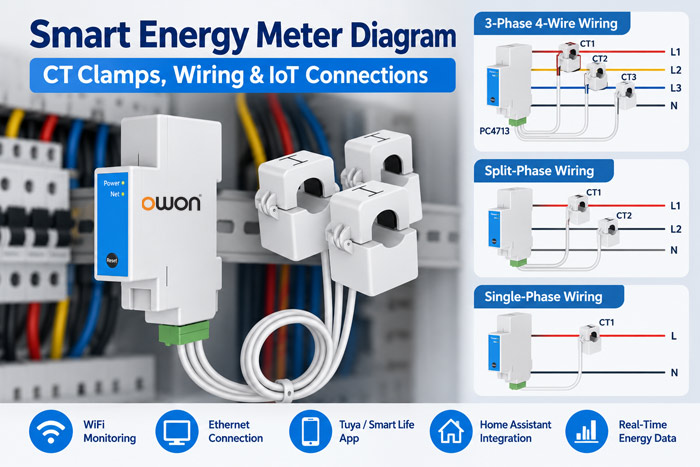
Smart Energy Meter Wiring Diagram: 4 Common Configurations
Electrical systems differ between countries and buildings. Before selecting a meter, it is important to understand the wiring arrangement.
The following examples are based on the OWON PC4713-W-E-TY/R installation guide.
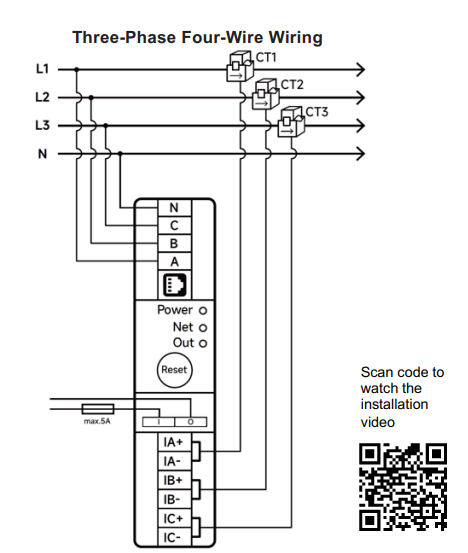
1. Three-Phase Four-Wire Energy Meter Diagram
A three-phase four-wire system uses three phase conductors (L1, L2, L3) and a neutral conductor (N).
In the PC4713 installation example:
- Voltage terminals A, B, C, and N correspond to L1, L2, L3, and neutral.
- CT1 measures L1 and connects to IA+ / IA-.
- CT2 measures L2 and connects to IB+ / IB-.
- CT3 measures L3 and connects to IC+ / IC-.
Each CT must be installed around its corresponding phase conductor, with the arrow pointing toward the loads, as specified in the installation guide.
This configuration is useful for monitoring three-phase electricity consumption in commercial buildings, workshops, and compatible residential electrical systems.
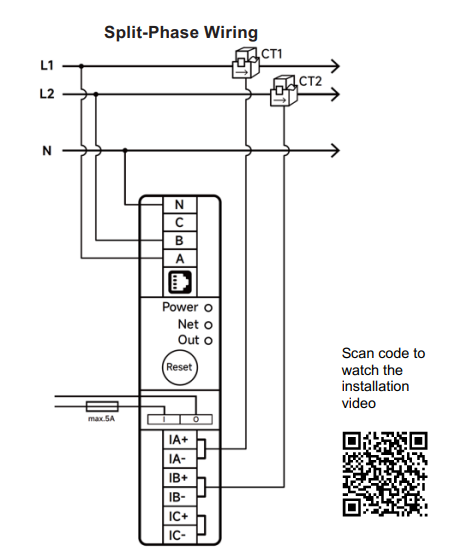
2. Split-Phase Energy Meter Diagram
Split-phase electrical supplies are common in North American residential installations.
A typical split-phase system provides two hot conductors and a neutral, allowing compatible equipment to operate at different supply voltages.
A split-phase smart energy meter measures the relevant conductors according to its supported wiring diagram.
The PC4713 installation guide includes a dedicated split-phase wiring arrangement.
This can be useful for whole-home electricity monitoring, including homes with solar installations.
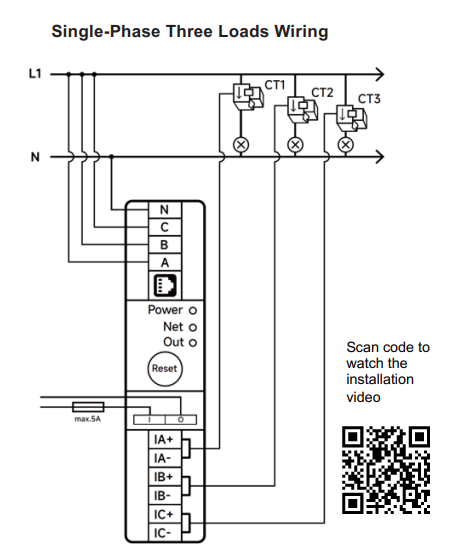
3. Single-Phase Energy Meter with Three Loads
Some energy meters can monitor multiple loads within a single-phase electrical system.
The PC4713 guide includes a single-phase three-load wiring diagram, demonstrating how three CT measurement channels can be used in a supported single-phase installation.
This arrangement may be useful when users want to monitor several electrical circuits rather than only one main supply.
The voltage reference and CT measurement circuits must correspond to the same phase, as specified in the installation instructions.
4. Single-Phase One-Circuit Energy Meter Diagram
For basic electricity monitoring, a single-phase meter configuration can measure one selected circuit.
In a CT-based arrangement, the meter measures the supply voltage while a CT clamp measures current in the monitored conductor.
This setup is suitable for applications where monitoring a single circuit is sufficient.
The exact connection method depends on the meter’s supported wiring configuration.
How Do CT Clamps Connect to a Smart Energy Meter?
A current transformer measures alternating current through magnetic induction.
Unlike a direct-connected current measurement device, a CT-based meter uses a separate sensor around the monitored conductor.
For the PC4713 three-phase example, the CT connections are:
| CT Clamp | Electrical Conductor | Meter Terminal |
|---|---|---|
| CT1 | L1 | IA+ / IA- |
| CT2 | L2 | IB+ / IB- |
| CT3 | L3 | IC+ / IC- |
Three details are especially important:
Correct phase matching: Each CT must correspond to the correct voltage phase.
Correct CT orientation: Follow the arrow direction specified by the manufacturer. Reversed orientation can affect the reported direction of energy flow.
Correct CT selection: The CT current rating and physical opening must match the installation requirements.
For example, the PC4713 supports different CT options, including 80A, 120A, 200A, 300A, 500A, and 750A. Measurement accuracy varies with the selected CT and current range.
CT clamps should be installed only according to the manufacturer’s instructions and applicable electrical safety requirements.
Smart Energy Meter IoT Connection Diagram
Electrical wiring determines how the meter measures electricity. Network connectivity determines how users access that information.
A typical IoT energy monitoring arrangement can be represented as:
Electrical Supply → Smart Energy Meter + CT Clamps → WiFi / Ethernet → Monitoring Platform → Mobile App
The OWON PC4713-W-E-TY/R supports both 2.4GHz WiFi and Ethernet connectivity.
Its Smart Life configuration process allows users to connect the device through a compatible WiFi network or an internet-connected Ethernet connection.
The meter can then provide supported real-time and historical energy information through the app.
According to its product guide, this version also supports Home Assistant platform integration.
For larger IoT projects, other energy meter versions may offer additional integration methods. MQTT, Modbus, and other protocols should be verified for the exact product version rather than assumed from Tuya compatibility.
Why Does CT Direction Matter for Solar Monitoring?
A bidirectional energy meter can measure electricity flowing in different directions at the monitored connection.
This is useful in solar installations where electricity may be imported from the grid or exported when solar production exceeds local demand.
However, the CT orientation and installation position affect how these measurements are interpreted.
A meter at the grid connection measures grid import and export. It does not automatically measure total solar generation separately.
Projects requiring both solar generation and building consumption data may need additional measurement points.
Common Smart Energy Meter Installation Mistakes
Several issues can affect a CT-based energy monitoring installation:
- Connecting a CT to the wrong measurement channel
- Reversing the CT direction
- Using an incorrect voltage reference
- Selecting an unsuitable CT current range
- Choosing a meter that does not support the electrical wiring system
- Installing the device where WiFi coverage is unreliable
For electrical safety, installation and wiring should be performed by qualified personnel. The circuit must be isolated and verified de-energized before work begins, following the manufacturer’s instructions and local regulations.
Frequently Asked Questions
What does a smart energy meter diagram show?
It shows the relationship between the electrical supply, voltage terminals, CT clamps, monitored circuits, and communication connections.
Can one smart energy meter monitor three phases?
Yes, if the model supports the required three-phase configuration and has suitable measurement channels. Not every three-phase meter supports both three-wire and four-wire systems.
Does a CT clamp need to be installed around all wires?
A CT should be placed around the conductor or conductors specified in the manufacturer’s wiring diagram. Placing a standard CT around both outgoing and returning conductors can cause their magnetic fields to cancel, resulting in an incorrect measurement.
Can a smart energy meter connect to WiFi?
Yes. WiFi-enabled models can transmit supported measurements to compatible monitoring platforms. Some models, such as the PC4713, also offer Ethernet connectivity.
Can a smart energy meter monitor solar generation?
A compatible bidirectional meter can monitor grid import and export. Separate solar generation monitoring depends on the installation layout and available measurement points.
Conclusion
Understanding a smart energy meter diagram helps users choose the correct electrical configuration, install CT clamps properly, and plan reliable energy monitoring.
For residential, commercial, and solar applications, wiring compatibility and CT placement are just as important as the monitoring software.
OWON Technology develops smart energy meters for WiFi, Ethernet, and other supported IoT connectivity options. The PC4713 provides a practical example of CT-based monitoring for single-phase, split-phase, and three-phase four-wire systems.
Explore OWON smart energy monitoring solutions for additional product and integration information.
Post time: Oct-25-2026