A Zigbee2MQTT socket enables smart appliance control through a Zigbee network, with optional energy monitoring and Home Assistant integration. Whether you’re upgrading a European smart home or planning a commercial building automation project, choosing the right socket and understanding its compatibility are essential.
This guide explains how Zigbee sockets work with Zigbee2MQTT, how to connect them, and what to consider when selecting devices for long-term installations.
What Is a Zigbee2MQTT Socket?
A Zigbee2MQTT socket is a Zigbee-enabled smart plug or in-wall socket that can communicate with a compatible Zigbee2MQTT setup.
Zigbee2MQTT acts as a bridge between Zigbee devices and MQTT-based automation systems, allowing users to manage supported devices without relying on a manufacturer’s proprietary cloud service.
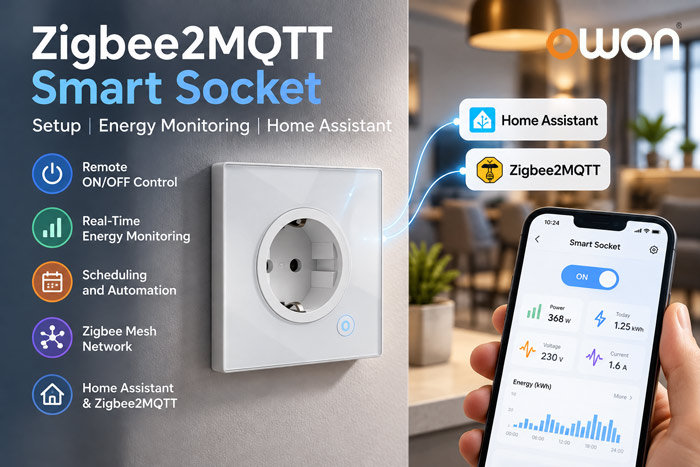
Depending on the device, available functions may include:
- Remote appliance ON/OFF control
- Real-time power monitoring
- Cumulative energy consumption tracking
- Scheduling and automation
- Zigbee mesh networking
Not every Zigbee socket supports all these functions. Device compatibility and exposed features should be checked before installation.
How to Connect a Zigbee Socket to Zigbee2MQTT
Connecting a supported Zigbee socket generally involves a few straightforward steps.
Step 1: Prepare Zigbee2MQTT
Make sure Zigbee2MQTT is running with a supported Zigbee coordinator and a working MQTT broker.
Step 2: Enable Device Pairing
Open the Zigbee2MQTT interface and enable Permit Join to allow new Zigbee devices to connect.
Step 3: Put the Socket into Pairing Mode
Follow the manufacturer’s instructions to reset the socket or activate its pairing mode. The procedure varies by model.
Step 4: Confirm Device Recognition
Once pairing is complete, check whether the socket appears in the Zigbee2MQTT device list.
Step 5: Test Available Functions
Verify ON/OFF control, power monitoring, energy reporting, and other supported features.
If the socket joins the network but some functions are unavailable, check its device support status and Zigbee2MQTT version.
Energy Monitoring with Zigbee2MQTT
Energy monitoring is an important feature for smart homes, apartments, hotels, and commercial energy management projects.
A compatible Zigbee socket may report several electrical measurements:
| Measurement | Description | Practical Use |
|---|---|---|
| Power (W) | Current electrical power | Monitor appliance demand |
| Energy (kWh) | Accumulated energy consumption | Track electricity usage |
| Voltage (V) | Supply voltage, if supported | Observe electrical conditions |
| Current (A) | Electrical current, if supported | Monitor connected loads |
| Switch State | ON/OFF status | Support remote control and automation |
For example, a building automation system can monitor the energy consumption of connected appliances and use the data to identify unnecessary electricity usage.
Energy monitoring availability, accuracy, and reporting intervals depend on the specific socket model.
Zigbee Smart Plug vs In-Wall Socket: Which Is Better?
Both Zigbee smart plugs and in-wall sockets can provide connected appliance control, but their installation requirements differ.
| Feature | Zigbee Smart Plug | Zigbee In-Wall Socket |
|---|---|---|
| Installation | Plugs into an existing outlet | Replaces a compatible wall socket |
| Portability | Easily removable | Permanently installed |
| Appearance | External plug-in device | Integrated wall design |
| Energy Monitoring | Model-dependent | Model-dependent |
| Typical Applications | Individual appliances and flexible installations | Apartments, hotels, and permanent building projects |
For European residential and commercial buildings, an in-wall Zigbee socket can offer a cleaner appearance and a more integrated installation.
However, electrical compatibility, local installation standards, and professional installation requirements must be considered.
Using a Zigbee2MQTT Socket with Home Assistant
Home Assistant can communicate with Zigbee2MQTT through MQTT integration, enabling supported Zigbee sockets to participate in local smart home automation.
Depending on the socket’s exposed features, users may be able to:
- Turn connected appliances ON or OFF
- Create time-based automation routines
- Monitor power and energy consumption
- Build energy usage dashboards
- Combine socket control with occupancy or temperature sensors
For example, an apartment automation system could switch off selected non-essential appliances when a room becomes unoccupied.
For commercial projects, system integrators should also consider gateway capacity, network coverage, MQTT configuration, and device compatibility before large-scale deployment.
Common Zigbee2MQTT Socket Pairing Problems
If a Zigbee socket does not connect or respond correctly, check the following:
1. Device Compatibility
Confirm that the exact socket model and firmware are supported by the installed Zigbee2MQTT version.
2. Pairing Mode
Make sure the device is in pairing mode and that joining is enabled in Zigbee2MQTT.
3. Network Coverage
Check the distance between the socket and the coordinator or nearby Zigbee routers.
4. Existing Network Connection
Some devices must be reset before joining a different Zigbee network.
5. Missing Device Functions
If the socket connects but energy monitoring is unavailable, check the device’s supported features and reporting configuration.
Note that errors such as ECONNRESET or WebSocket not open usually relate to software communication rather than the physical wall socket itself.
Choosing a Zigbee Socket for European Buildings
When selecting a Zigbee socket for European smart home or commercial building projects, consider:
- Electrical compatibility: Confirm the socket type, rated voltage, load capacity, and local installation requirements.
- Energy monitoring: Check whether real-time power and cumulative energy data are available.
- Automation compatibility: Verify integration with the intended Zigbee gateway or software platform.
- Network performance: Consider Zigbee mesh coverage and the placement of powered routing devices.
- Long-term deployment: Evaluate installation, maintenance, and integration requirements.
OWON WSP406 Zigbee Wall Socket for EU Installations
The OWON WSP406 Zigbee Wall Socket is designed for European in-wall installations, combining Zigbee 3.0 connectivity, remote appliance control, energy monitoring, and mesh networking.
With a rated load capacity of up to 16A / 3000W, it provides a practical option for smart homes, serviced apartments, hotels, and commercial building energy management projects.
For Zigbee2MQTT deployments, system integrators should verify support for the exact WSP406 hardware and firmware version, including the availability of switch control and energy monitoring functions.
Frequently Asked Questions
1. Does every Zigbee socket work with Zigbee2MQTT?
No. Zigbee2MQTT supports many Zigbee devices, but compatibility and available functions vary by model and firmware version. Check the official supported-device database before purchasing.
2. Can a Zigbee2MQTT socket monitor electricity consumption?
Yes, if the socket includes energy metering hardware and its Zigbee2MQTT integration exposes the relevant measurements. Some devices support ON/OFF control only.
3. Do Zigbee sockets need a gateway?
Zigbee sockets require a compatible Zigbee network coordinator or gateway for connected operation. Zigbee2MQTT typically uses a supported coordinator together with MQTT software.
4. Can Zigbee2MQTT sockets work with Home Assistant?
Yes. Supported Zigbee sockets can be integrated with Home Assistant through Zigbee2MQTT and MQTT integration, enabling local control and automation.
5. Are Zigbee in-wall sockets suitable for European hotels and apartments?
Yes. Compatible in-wall Zigbee sockets can support appliance control and energy monitoring in residential and hospitality projects. Electrical specifications, installation requirements, and platform compatibility should be verified before deployment.
Conclusion
A Zigbee2MQTT socket can provide flexible appliance control, local automation, and energy monitoring without requiring a proprietary cloud platform.
For European installations, the choice between a plug-in smart socket and a permanent in-wall socket depends on electrical requirements, deployment scale, and integration needs.
By selecting compatible devices and planning the Zigbee network carefully, homeowners and system integrators can build reliable, scalable smart energy management solutions.
Post time: Oct-20-2026


