A Zigbee2MQTT switch allows users to control compatible ZigBee devices through an MQTT-based automation system. Whether switching lights, managing electrical equipment, or monitoring energy consumption, Zigbee2MQTT provides a flexible way to integrate smart switches with Home Assistant and other compatible platforms.
However, not all ZigBee switches work in the same way. Some provide basic ON/OFF control, while others support scene actions, multi-channel switching, or power monitoring.
Understanding these differences is essential when selecting a ZigBee switch for smart homes, commercial buildings, and energy management projects.
What Is a Zigbee2MQTT Switch?
A Zigbee2MQTT switch is a compatible ZigBee device that communicates with the Zigbee2MQTT software through a ZigBee coordinator.
Zigbee2MQTT acts as a bridge between ZigBee devices and an MQTT-based system, allowing supported devices to be monitored and controlled without relying on a manufacturer’s proprietary cloud platform.
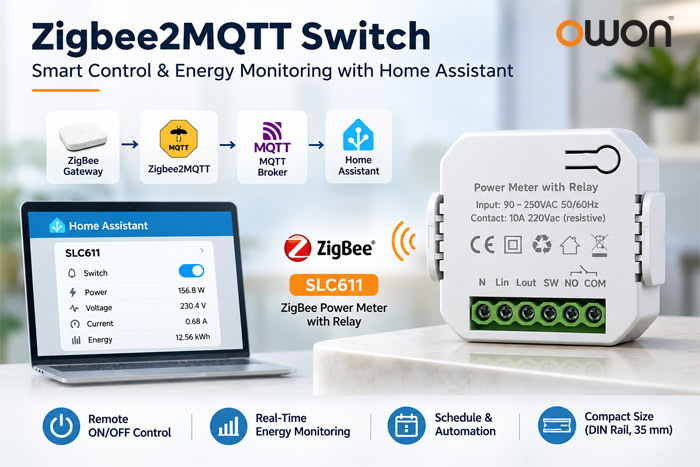
A typical system includes:
- ZigBee Switch: Controls connected electrical equipment or sends control commands.
- ZigBee Coordinator: Connects ZigBee devices to the local network.
- Zigbee2MQTT: Translates supported ZigBee functions into MQTT messages.
- MQTT Broker: Handles message exchange between connected systems.
- Home Assistant: Provides dashboards, schedules, and automation management.
Once configured, compatible switches can be used for remote control, scheduled operation, and automated building management.
Zigbee2MQTT Switch Types: Smart Switch vs. Scene Switch
Before choosing a device, it is important to distinguish between electrical switching and scene control.
| Switch Type | Main Function | Typical Application |
|---|---|---|
| ZigBee Smart Switch | Turns connected electrical equipment ON/OFF | Lighting, electrical loads |
| ZigBee Relay Switch | Controls equipment through relay contacts | Building automation, HVAC control circuits |
| ZigBee Scene Switch | Sends commands to trigger automation scenes | Smart lighting, room control |
| ZigBee Smart Switch with Power Monitoring | Combines switching and electrical measurement | Energy management, smart buildings |
For example, a wireless scene switch may trigger a lighting automation without directly switching an electrical load.
In contrast, a ZigBee relay switch can control an electrical circuit through its output contacts.
For energy management applications, a switch with integrated power monitoring provides additional information about electricity consumption.
Zigbee2MQTT Switch Actions: Toggle, State, and Momentary Explained
Users configuring Zigbee2MQTT switches may encounter terms such as toggle, state, momentary, and action.
Although these terms are related, they describe different control behaviors.
Toggle
A toggle command changes the current switch state.
For example, if a light is ON, a toggle command turns it OFF. Sending another toggle command turns it ON again.
This is useful for simple lighting control and automation routines.
State
The state property generally represents the current ON/OFF condition of a supported switch.
For example:
ON: The switch is activated.OFF: The switch is deactivated.TOGGLE: A command to reverse the current state, when supported.
Home Assistant can use this information to display and control the switch.
Momentary
Momentary typically refers to a push-button input that returns to its original physical position after being pressed.
Some Zigbee2MQTT-compatible switch modules offer configurable input modes such as toggle, state, and momentary.
However, these configuration options are device-specific and should not be assumed to exist on every ZigBee switch.
Action
An action represents an event reported by a compatible device, such as a button press or scene command.
Unlike a persistent ON/OFF state, an action can be used to trigger a separate automation.
For example, a scene controller might send an action that causes Home Assistant to activate several smart lights.
When selecting a Zigbee2MQTT switch, always check the supported features of the exact device model.
How to Add a Zigbee2MQTT Switch to Home Assistant
Home Assistant can integrate Zigbee2MQTT devices through MQTT discovery.
The general setup process includes the following steps.
Step 1: Prepare the ZigBee Coordinator
Connect a supported ZigBee coordinator to the system running Zigbee2MQTT.
Make sure the coordinator is correctly configured and accessible.
Step 2: Configure Zigbee2MQTT and MQTT
Install and configure Zigbee2MQTT with an MQTT broker.
Verify that Zigbee2MQTT can communicate with the broker before attempting to pair devices.
Step 3: Enable Device Pairing
Open the Zigbee2MQTT interface and enable device joining.
Put the ZigBee switch into pairing mode according to its manufacturer’s instructions.
Once detected, the device should appear in the Zigbee2MQTT device list.
Step 4: Connect to Home Assistant
Enable MQTT integration in Home Assistant and configure Zigbee2MQTT’s Home Assistant integration.
With MQTT discovery enabled, supported device entities can be created automatically.
Step 5: Test Switching and Automation
After pairing, verify the available device functions.
Depending on the model, these may include:
- ON/OFF control
- Switch state reporting
- Power consumption
- Voltage and current monitoring
- Automation actions
- Power-on behavior
Not every device supports every function. The available controls depend on the Zigbee2MQTT device definition and firmware.
Zigbee2MQTT Switch with Power Monitoring: OWON SLC611
For applications requiring both electrical control and energy visibility, the OWON SLC611 ZigBee Power Meter with Relay provides an integrated solution.
Unlike a basic ON/OFF switch, the SLC611 combines relay control with electrical measurement, making it suitable for smart building automation and energy monitoring systems.
Key Features of OWON SLC611
- ZigBee 3.0 Connectivity: Supports 2.4 GHz IEEE 802.15.4 wireless communication.
- Remote ON/OFF Control: Enables switching through compatible control systems.
- Real-Time Power Monitoring: Measures voltage, current, power factor, and active power.
- Energy Measurement: Tracks accumulated electricity consumption and supports energy usage/production measurement.
- 10A Dry Contact Output: Provides relay control for suitable electrical circuits.
- External Switch Input: Supports integration with a physical switch input.
- Scheduling: Enables automatic ON/OFF operation through a compatible automation system.
- DIN Rail Installation: Designed for mounting on a standard 35 mm DIN rail.
The device operates from 90–250 VAC at 50/60 Hz.
Its specified calibrated metering accuracy is within ±2 W at loads up to 100 W and within ±2% above 100 W.
Zigbee2MQTT Compatibility
The OWON SLC611 is listed in the official Zigbee2MQTT supported-device database as a ZigBee smart switch with power metering.
Its documented exposed features include:
| Zigbee2MQTT Feature | Function |
|---|---|
| Switch State | ON/OFF control |
| Power | Instantaneous power measurement in watts |
| Voltage | Electrical voltage measurement |
| Current | Electrical current measurement |
| Power Factor | Electrical power factor reporting |
| Energy | Accumulated energy consumption in kWh |
| Power-on Behavior | Configurable state after power restoration |
These capabilities make the SLC611 particularly relevant to users searching for a Zigbee2MQTT switch that offers more than basic switching.
The documented MQTT switch interface supports ON, OFF, and TOGGLE commands.
For example, after assigning a friendly device name, the following MQTT message can request switching ON:
Topic: zigbee2mqtt/slc611/set
Payload: {"state":"ON"}
Here, slc611 is an example friendly name and must match the name configured in Zigbee2MQTT.
The SLC611 also provides energy-related data that can be used by compatible monitoring and automation systems.
Product information: OWON SLC611-Z ZigBee Power Meter with Relay
Where Can a Zigbee2MQTT Switch Be Used?
A Zigbee2MQTT switch can support a wide range of residential and commercial automation applications.
Smart Lighting Control
Compatible ZigBee switches can be used to turn lighting circuits ON/OFF according to schedules, occupancy conditions, or automation rules.
Smart Building Energy Monitoring
A switch with integrated electrical measurement can provide information about connected equipment consumption.
For example, the OWON SLC611 combines switching with power and energy measurements, allowing system integrators to develop equipment monitoring and control applications.
Hotel and Apartment Automation
ZigBee switches can be integrated into room automation systems to support scheduled control and centralized equipment management.
In retrofit projects, wireless scene switches may complement relay-based devices where flexible control locations are required.
OEM/ODM Smart Control Solutions
For equipment manufacturers, distributors, and system integrators, ZigBee switching devices can form part of customized smart building and energy management solutions.
OWON provides ZigBee devices and OEM/ODM development services for projects requiring hardware customization and system integration.
How to Choose the Right Zigbee2MQTT Switch
When selecting a Zigbee2MQTT-compatible switch, consider the following factors:
- Device Compatibility: Confirm the exact model and firmware are supported by Zigbee2MQTT.
- Switching Function: Determine whether direct electrical switching or scene control is required.
- Electrical Specifications: Check operating voltage, relay contact ratings, and installation requirements.
- Energy Monitoring: Choose a metering-enabled model when power and energy measurements are necessary.
- Home Assistant Integration: Review available MQTT entities and automation capabilities.
- Project Requirements: Consider installation environment, device quantity, maintenance, and system scalability.
For projects requiring switching and electrical monitoring in one device, the OWON SLC611 is a practical option to evaluate.
FAQ
Does Zigbee2MQTT work with Home Assistant?
Yes. Zigbee2MQTT can integrate with Home Assistant through an MQTT broker and MQTT discovery, allowing supported ZigBee devices to appear as controllable or monitored entities.
Does a Zigbee2MQTT switch need a coordinator?
Yes. Zigbee2MQTT requires a supported ZigBee coordinator to communicate with ZigBee devices. The coordinator is separate from the MQTT broker and automation platform.
What is the difference between a Zigbee2MQTT switch and a ZigBee scene switch?
A Zigbee2MQTT smart switch typically controls an electrical load through an exposed switch entity. A scene switch primarily sends events or commands that can trigger automations. Some devices combine multiple functions.
Can a Zigbee2MQTT switch monitor electricity consumption?
Yes, if the device includes metering hardware and exposes the relevant measurements. For example, the OWON SLC611 supports power, voltage, current, power factor, and energy reporting.
Can I use a Zigbee2MQTT switch without the internet?
Yes. A properly configured local Zigbee2MQTT system can operate without an internet connection, provided the coordinator, MQTT broker, and required automation services remain available locally.
Why is my Zigbee2MQTT switch not showing in Home Assistant?
Possible causes include unsuccessful pairing, MQTT connection issues, disabled Home Assistant discovery, or an unsupported device configuration. Check the Zigbee2MQTT device list, MQTT integration, and device logs before resetting the switch.
Conclusion
Choosing the right Zigbee2MQTT switch depends on whether the application requires simple ON/OFF control, scene automation, or integrated energy monitoring.
For Home Assistant users, Zigbee2MQTT provides a flexible method of connecting supported ZigBee devices to local automation systems.
For smart building and energy management projects, devices such as the OWON SLC611-Z ZigBee Power Meter with Relay combine switching and electricity measurement in a compact DIN-rail design.
As an experienced IoT device manufacturer, OWON Technology offers ZigBee smart control devices, energy monitoring products, and OEM/ODM solutions for distributors, system integrators, and smart building solution providers.
Looking for ZigBee switches with energy monitoring or customized OEM/ODM integration? Contact OWON to discuss product specifications, samples, and project requirements.
Post time: Nov-01-2026