Introduction
Choosing the right fall detector for elderly residents is only half the job. The other half — the part that determines whether the system actually works when it matters — is how and where you install it.
Poor sensor placement is one of the leading causes of missed fall alerts and false alarms in care home deployments. A sensor mounted too high, angled incorrectly, or positioned in a corner with obstructions can fail to detect a fall even when the hardware itself is perfectly capable.
This guide walks through a practical, room-by-room deployment framework for ZigBee fall detection sensors, based on 60GHz millimeter-wave radar technology. Whether you are a system integrator planning a 50-room rollout or a care home facility manager setting up your first smart monitoring system, this guide will help you get the installation right from day one.
Why Fall Detection Systems Are Becoming Essential in Modern Care Homes
Care homes and assisted living facilities are increasingly adopting fall detection technologies as part of broader elderly monitoring strategies.
Falls remain one of the leading causes of injury among older adults, particularly during bed transfers, nighttime bathroom visits, and mobility-related activities.
Modern fall detection sensors help care providers improve resident safety by automatically detecting incidents and enabling faster response times. Unlike traditional emergency buttons, these systems do not rely on residents actively requesting help.
As a result, many operators are incorporating fall monitoring into larger elderly monitoring systems that also include occupancy sensing, door monitoring, and caregiver notification workflows.
Why Placement Matters More Than the Spec Sheet
Most care home operators focus on sensor specifications — detection range, response time, protocol version — when making procurement decisions. These matter, but they assume optimal installation conditions.
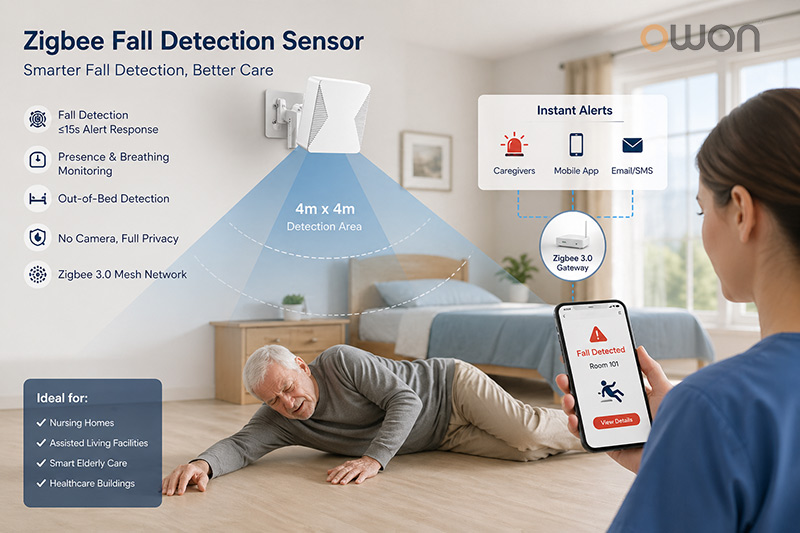
A 60GHz radar fall detection sensor with a 4×4m detection range will only deliver that range if it is mounted at the correct height, with an unobstructed line across the room, and aimed at the highest-risk zones within the space.
Three placement errors account for the majority of real-world performance complaints:
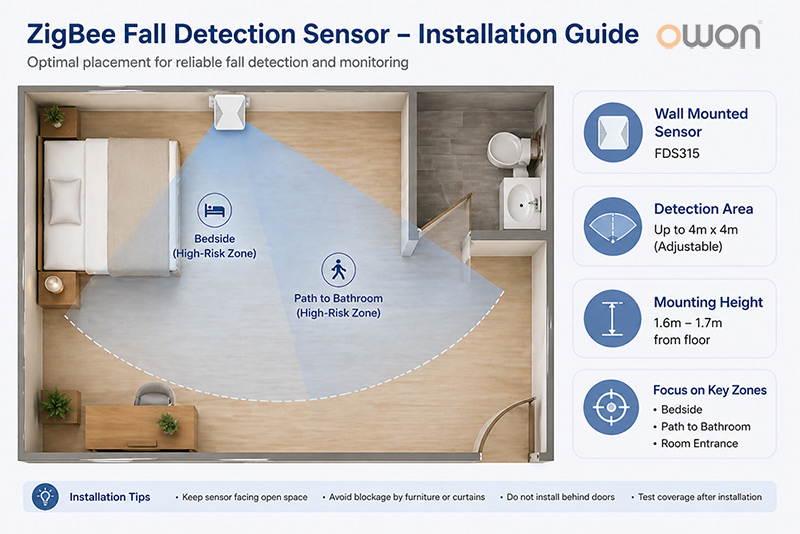
1. Mounting too high or too low. Radar sensors designed for wall mounting at 1.6–1.7 metres are calibrated for that specific detection geometry. Installing at ceiling height (as some PIR sensors are) will change the detection angle and reduce fall recognition accuracy.
2. Pointing at walls rather than open floor space. The sensor needs to “see” the area where a person is most likely to fall — beside the bed, near the bathroom entrance, or at the room threshold. If the sensor faces a wardrobe or a wall, it is monitoring furniture, not people.
3. Insufficient coverage for room transitions. Falls frequently happen at doorways and in the path between the bed and the bathroom. A single sensor placed at the far end of a room may cover the sleeping area well but leave the highest-risk transit zone unmonitored.
Step 1: Prioritise Rooms by Fall Risk
Before purchasing sensors, map the facility by fall risk level. Not every room carries equal risk, and budget allocation should reflect this.
Priority 1 — Private bedrooms (highest risk) The majority of falls in care home settings occur during nighttime and early morning hours, during bed transfers and trips to the bathroom. Every private room housing a resident with a fall history or mobility impairment should have a dedicated sensor. Out-of-bed detection and static presence monitoring are particularly critical here.
Priority 2 — En-suite bathrooms and wet rooms Bathrooms account for a disproportionate number of serious falls due to wet surfaces and the physical effort of toilet and shower transfers. If your ZigBee fall detection sensor has an appropriate IP rating for humid environments, bathroom coverage should be part of the deployment plan.
Priority 3 — Shared corridors and lounges These are lower-priority for individual fall detection but benefit from sensors that can confirm presence and alert staff to unusual inactivity — for example, a resident who has been stationary in a corridor for an extended period.
Step 2: Room-by-Room Sensor Placement Guide
Private Bedrooms
Mount the sensor on the wall facing the bed and the path to the bathroom. The optimal height is 1.6–1.7 metres from the floor, as specified for wall-mounted 60GHz radar sensors such as the OWON FDS315 ZigBee Fall Detection Sensor. Position it so the detection cone covers the bedside area, the floor space between the bed and the door, and ideally the bathroom entrance.
Coverage footprint to aim for:
| Zone | Priority |
|---|---|
| Beside the bed (transfer zone) | Must cover |
| Floor path to bathroom | Must cover |
| Desk or seating area | Cover if possible |
| Room entrance | Secondary |
For rooms larger than 4×4 metres, consider two sensors positioned to cover overlapping zones, ensuring no blind spots at the far corners.
En-Suite Bathrooms
Install the sensor on the wall opposite the toilet or shower, at the same 1.6–1.7m height. Ensure the chosen device is rated for humid environments. The sensor should have a clear sightline to the floor area in front of the toilet and shower tray — the two highest-risk zones.
Note that fall detection on this type of radar sensor is optimised for single-occupancy environments, which makes it naturally well-suited to private en-suite spaces.
Shared Lounges and Common Areas
In larger open-plan spaces, wall-mounted sensors should be placed at regular intervals along the longer walls, each covering a defined zone. Use the ZigBee Mesh repeater capability of the sensors themselves to maintain network connectivity across the space without additional hardware. The OWON FDS315, for instance, also functions as a ZigBee router, extending network range as part of its deployment rather than requiring a separate repeater device.
Step 3: Building Your ZigBee Mesh Network Across the Facility
One of the practical advantages of ZigBee for care home fall detection systems is the self-healing mesh architecture. Unlike Wi-Fi, which relies on centralised access points, each ZigBee device in router mode can relay signals from neighbouring devices — meaning a well-planned deployment becomes more reliable as more sensors are added.
Network planning guidelines:
- Place your ZigBee gateway centrally in the facility, or on each floor for multi-storey buildings.
- Sensors in router mode (such as the FDS315) will automatically extend coverage — factor this into your room sequencing. Install sensors floor by floor, starting closest to the gateway and working outward.
- Maintain a maximum hop count of 4–5 devices between any sensor and the gateway to avoid latency in alert transmission.
- For facilities with reinforced concrete floors or walls, reduce the assumed ZigBee range from the 100m open-air specification to approximately 15–20m per hop indoors.
Recommended gateway placement for a 30-room single-floor care home:
For a 30-room single-floor care home, position the ZigBee gateway at the central nurse station or main corridor junction — the point with the shortest physical distance to the greatest number of rooms. From this central anchor, corridor-mounted sensors in router mode form the first relay layer, connecting directly to the gateway. Bedroom sensors in the nearest wing attach to the network through these corridor relays, while rooms in the far wing and shared common areas connect through a second relay hop. This layered approach ensures that no individual sensor is more than three hops from the gateway, keeping alert transmission latency well within acceptable limits for emergency response workflows.
| Network Layer | Location | Role | Max Hops to Gateway |
|---|---|---|---|
| Layer 0 | Nurse station / Main corridor | ZigBee Gateway (coordinator) | 0 |
| Layer 1 | Corridor sensors | Router — first relay ring | 1 hop |
| Layer 2 | Bedrooms 1–15 (near wing) | Router + fall detector | 2 hops |
| Layer 3 | Bedrooms 16–30 (far wing) | Router + fall detector | 3 hops |
| Layer 3 | Shared lounge / common areas | Router + fall detector | 3 hops |
For multi-storey facilities, treat each floor as an independent mesh segment with its own gateway or sub-coordinator. This prevents network congestion and ensures that a connectivity issue on one floor does not affect alert delivery on another.
Step 4: Integrating with Your Care Platform or BMS
Once the physical network is in place, the next step is connecting sensor alerts to your monitoring infrastructure. This is where care home fall detection moves from hardware installation to operational value.
Option A: Cloud-based care platform integration Via a compatible ZigBee gateway, sensor events (fall detected, bed exit, abnormal inactivity) are pushed to a cloud dashboard accessible to on-duty staff via web or mobile app. This is the fastest to configure and suits smaller facilities or operators who prefer managed services.
Option B: Local server deployment (recommended for UK and EU care homes) For facilities operating under UK GDPR or processing sensitive health data under care home regulatory frameworks, local server deployment keeps all resident monitoring data on-premise. No personal data leaves the building. This approach is increasingly favoured by CQC-registered care homes in England as a way to demonstrate data governance to inspectors.
OWON’s ZigBee gateway supports local server configuration, making this a viable option without requiring third-party middleware.
Option C: BMS integration For larger facilities with existing Building Management Systems, ZigBee sensor data can be routed into centralised BMS dashboards, enabling room-level safety analytics alongside energy and environmental monitoring. This is particularly relevant for NHS-commissioned care facilities and purpose-built assisted living developments.
Further reading: Evaluating the Sensitivity of ZigBee Fall Detection Sensors → covers how to interpret and calibrate alert thresholds once your system is live.
Common Deployment Mistakes and How to Avoid Them
Even experienced integrators encounter avoidable issues during care home rollouts. The following are the most frequently reported problems and their solutions.
Mistake 1: Ignoring furniture obstruction Large wardrobes, bed frames with solid headboards, or curtains drawn across the detection zone will block radar signals. Conduct a physical walkthrough of each room before finalising mounting positions. Move the sensor bracket laterally if needed to ensure an unobstructed view of the high-risk zones.
Mistake 2: Treating all rooms as identical Room layouts in care homes vary significantly. A standard deployment template should be treated as a starting point, not a fixed rule. Rooms with unusual shapes, structural pillars, or en-suite configurations may require adjusted sensor positioning.
Mistake 3: Forgetting network testing before go-live Deploy the full ZigBee mesh and run a 24-hour network stability test before residents are moved in or the system goes live. Check signal strength at each endpoint using your gateway’s diagnostic interface. Replace any sensor showing consistently weak RSSI readings with an additional router-mode device in the chain.
Mistake 4: No staff alert protocol A fall detector alarm is only as effective as the response it triggers. Before going live, define and document the alert escalation workflow — who receives the notification, how it is acknowledged, and what happens if no response is logged within a defined timeframe. This is not a technical issue, but it determines real-world outcomes more than any hardware specification.
Frequently Asked Questions
Q: What is a fall detection sensor and how does it work?
A: A fall detection sensor uses radar or other sensing technologies to identify potential fall events and automatically notify caregivers or monitoring platforms. Modern ZigBee-based sensors can also support occupancy monitoring, out-of-bed detection, and real-time alert transmission.
Q: Why are fall detection devices important in care homes?
A: Fall detection devices help care providers identify incidents more quickly, improve response times, and enhance resident safety, particularly for individuals with mobility challenges or a history of falls.
Q: How many ZigBee fall detection sensors do I need per floor? A: For a standard care home floor with private bedrooms, plan one sensor per bedroom as a baseline. Add sensors for shared bathrooms, lounges, and corridors based on your risk assessment. A 20-bedroom floor typically requires 22–26 sensors in total when common areas are included.
Q: Can these sensors work without an internet connection? A: Yes. ZigBee operates as a local mesh network. If you use a local server deployment, the entire fall detection system — from sensor to alert — functions without cloud dependency. This is particularly relevant for UK care homes where data sovereignty is a compliance consideration.
Q: What is the maximum number of sensors per ZigBee gateway? A: This depends on the gateway model. Most commercial ZigBee gateways support 50–200 end devices. For large facilities, deploy multiple gateways and segment the network by floor or wing.
Q: Are radar-based fall detection alarms for the elderly GDPR-compliant? A: Radar sensors detect motion and physical events — they do not record audio or video. Combined with local server deployment, this makes them one of the most privacy-compliant fall detection options available for European care facilities. Always consult your data protection officer to confirm your specific configuration meets UK GDPR requirements.
Q: How long does a full care home deployment take? A: For a 30-room facility, an experienced two-person installation team typically completes physical mounting and network commissioning in two to three days. Platform integration and staff training add one to two additional days.
Summary: Deployment Checklist
Before going live, confirm the following:
-Room priority map completed, bedrooms and bathrooms identified as primary zones
-Sensor mounting positions marked at 1.6–1.7m, facing high-risk floor areas
-Furniture and obstruction walkthrough completed for each room
-ZigBee gateway positioned centrally; mesh topology tested
-24-hour network stability test passed
-Alert escalation protocol documented and staff trained
-Data storage option confirmed (cloud vs local server)
-Integration with care platform or BMS tested end-to-end
Ready to Plan Your Deployment?
OWON’s FDS315 is purpose-built for professional care home deployments — combining 60GHz radar fall detection, real-time breathing monitoring, and ZigBee 3.0 mesh networking in a single wall-mounted device designed for fall detection in single-occupancy rooms.
Related reading: If you are still evaluating which sensor to procure, see our guide on Why B2B Buyers Choose Smart ZigBee Fall Detection Sensors →
Post time: Apr-27-2026