Why Smart Thermostats Need a C-Wire
As more homeowners upgrade to smart WiFi thermostats, one of the most common installation problems is the absence of a C-wire.
Most modern smart thermostats require continuous 24VAC power to support:
- WiFi connectivity
- Mobile APP control
- Scheduling functions
- Remote monitoring
- Smart automation
However, many older HVAC systems only provide 3-wire or 4-wire thermostat wiring and do not include a dedicated common wire.
In these situations, a C-wire adapter becomes a practical retrofit solution.
What Is a C-Wire Adapter?
A C-wire adapter, also called a thermostat power adapter or 24VAC power module, is designed to provide constant power for smart thermostats when no C-wire is available.
Instead of opening walls or replacing thermostat cables, the adapter reconfigures existing HVAC wiring to deliver stable power to the thermostat.
Typical applications include:
- Smart thermostat retrofit projects
- Older homes without a C-wire
- Apartment HVAC upgrades
- WiFi thermostat installations
- Residential and light commercial HVAC systems

When Is a C-Wire Adapter Needed?
You may need a C-wire adapter if:
- The existing thermostat wiring does not include a C terminal
- Your thermostat display randomly turns off
- The thermostat loses WiFi connection frequently
- Your HVAC system only has 3-wire or 4-wire control wiring
- You want to avoid running new thermostat cables
In many retrofit HVAC installations, systems using R, G, and Y/Y1 wires can support C-wire adapter installation without running new thermostat wiring.
Compatible HVAC Systems
A 24VAC C-wire adapter is commonly used with:
- Gas furnaces
- Electric furnaces
- Boilers
- Air conditioners
- Heat pump systems
- Dual fuel HVAC systems
For example, modern WiFi thermostats such as the OWON PCT5231 support conventional HVAC systems and heat pump configurations commonly used in North America.
How a C-Wire Adapter Works
The adapter is typically installed near the HVAC control board.
It works by redistributing existing thermostat wiring to provide continuous 24VAC power for the thermostat without requiring a dedicated common wire from the wall.
This approach is widely used in retrofit HVAC projects because it simplifies installation while reducing labor costs.
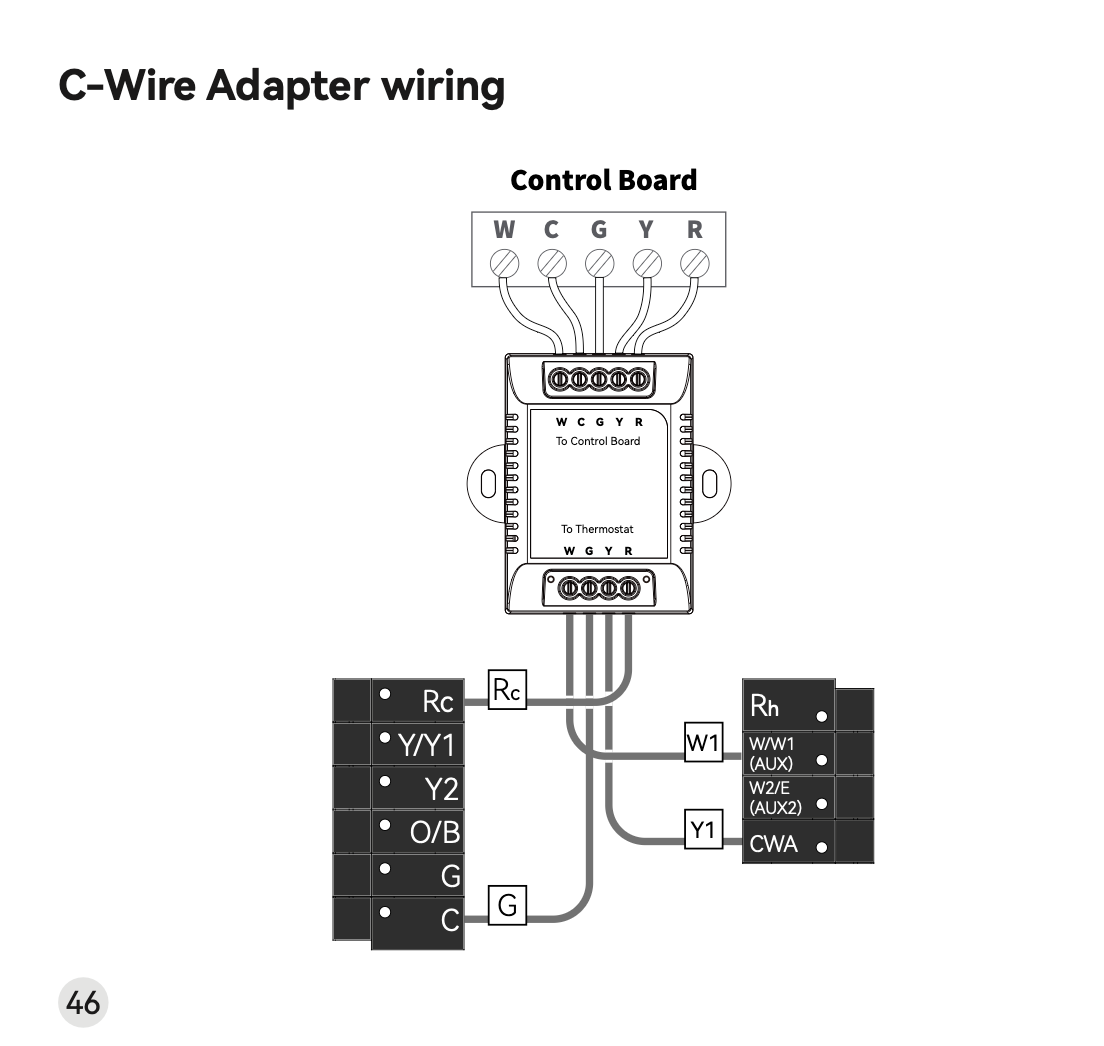
Basic C-Wire Adapter Installation Process
Step 1: Turn Off HVAC Power
Before installation, always shut off power to the HVAC system at the breaker panel.
Step 2: Check Existing Thermostat Wiring
Remove the thermostat faceplate and verify available wires.
Most C-wire adapter installations require:
- R wire
- G wire
- Y/Y1 wire
If these wires are present, the HVAC system may support adapter-based installation.
Step 3: Install the Adapter at the HVAC Control Board
The adapter connects between:
- HVAC control board
- Existing thermostat wires
- Smart thermostat terminals
This allows the thermostat to receive stable 24VAC power without rewiring the home.
Step 4: Complete Thermostat Wiring
After installation, reconnect thermostat wires to the wall plate terminals according to the thermostat wiring diagram.
The thermostat should then operate normally with stable power and WiFi connectivity.
C-Wire Adapter vs Running a New C-Wire
Many HVAC installers prefer C-wire adapters for retrofit projects because they reduce installation complexity.
| C-Wire Adapter | Running New C-Wire |
|---|---|
| Faster installation | More labor intensive |
| Lower retrofit cost | Higher installation cost |
| Minimal wall damage | May require drywall work |
| Ideal for existing homes | Better for major renovations |
For most smart thermostat upgrades, a C-wire adapter is often the more practical solution.
Common Installation Questions
Can a Smart Thermostat Work Without a C-Wire?
Yes. A compatible C-wire adapter can provide constant power without requiring new wiring installation.
Does Every Smart Thermostat Require a C-Wire?
Many WiFi thermostats require continuous 24VAC power for smart functions such as app control and scheduling.
Is a C-Wire Adapter Safe for HVAC Systems?
When properly installed, a 24VAC C-wire adapter is commonly used in residential HVAC retrofit projects.
Recommended C-Wire Adapter Solution
The OWON SWB511 is a 24VAC C-wire adapter designed for smart thermostat installations where no common wire is available.
It supports OWON WiFi thermostat retrofit projects and helps installers simplify upgrades without pulling new thermostat cables.
Typical applications include:
- Smart home thermostat upgrades
- Apartment HVAC retrofits
- Residential HVAC modernization
- WiFi thermostat installation projects
FAQ
What is a C-wire adapter used for?
A C-wire adapter provides continuous 24VAC power for smart thermostats when no common wire is available.
Can I install a smart thermostat without a C-wire?
Yes. A compatible C-wire adapter allows WiFi thermostats to operate without installing new wires through walls.
What HVAC systems support C-wire adapters?
Most 24VAC HVAC systems, including furnaces, boilers, air conditioners, and heat pumps, can support C-wire adapter installation.
Does the SWB511 work with WiFi thermostats?
Yes. The SWB511 is designed for OWON WiFi thermostat retrofit installations and compatible smart thermostat projects.
Conclusion
As smart thermostat adoption continues to grow, C-wire adapters have become an important solution for HVAC retrofit installations.
For homes and buildings without a common wire, a properly installed 24VAC C-wire adapter can simplify thermostat upgrades while avoiding costly rewiring work.
For HVAC contractors, property upgrade projects, and smart home retrofits, C-wire adapters provide a practical and installation-friendly approach to modern thermostat deployment.
Related reading:
[Smart Thermostat Sensors: The Complete Guide for Commercial Buildings]
Post time: Nov-09-2025